What is phishing?
Phishing is a process where scamsters trick you into giving them your user IDs, passwords or credit card details, so that they can gain access to your online banking accounts.
Victims are known to receive phone calls, SMS or most frequently emails claiming to be from a bank or trading partner, asking them for personal information to re-register or update their accounts. Soon after they've provided this information, they usually find that their banking accounts have been cleared out.
How do I recognise a phishing scam / site?
1. you receive a phone call, SMS or email asking you to provide personal/ security information or TAC
2.a phishing email link, when clicked, will open into an un-secure login site, with its URL most likely to begin with http, instead of the secure https
3. The phishing site's URL may contain misspelled words, like "Mybank" instead of Maybank.
Sample of Phising Site
http://www.rhb.com.my/internet_banking/security/spoof.html
http://www.pbebank.com/en/en_content/info/scams.html
Advice from Bank
http://www.eonbank.com.my/personal_banking/internetbanking/online_security.shtml
http://www.cimbclicks.com.my/mfa-announce.htm
http://www.alliancebank.com.my/security_alert.html
http://www.hsbc.com/1/2/onlinesecurity
http://www.standardchartered.com/online-banking/security-tips/general-computer-security-information/en/index.html
https://www.citibank.com.sg/global_docs/info/security/home.htm
https://www.citibank.com.sg/global_docs/info/security/precaution.htm
How do I prevent phishing attempts?
1. Do not trust any phone calls, SMS, e-mail, web and chat that requests for your personal details and identity.
2. Never click on a URL link in an e-mail or fill out forms in e-mail messages and un-trusted websites.
3. Go directly to your bank's web site to access Internet Banking and manually key in the company's web site address in the browser's URL bar.
4. Keep up-to-date with the latest security patches. Update your Operating System and Internet Browser with the latest patches, making sure all security and critical patches are applied. Use anti-virus software and, if possible, personal firewalls. Ensure your anti-virus software is up to date with the latest signatures.
5. Scanning your PC regularly from a popular anti-virus web site is also recommended.
6. Lastly, if an online money-making scheme seems too good to be true, it probably is. This generally holds true for off-line schemes as well!
Police alert!Don't be a victim of phishing scams!
Protect yourself from identity theft today
•NEVER respond to any phone call / SMS / email requesting your bank account details
•NEVER reveal your bank account details / ATM PIN / Internet banking password to anyone
•NEVER follow instructions from unknown parties to do banking transactions or make changes to your bank account details
•NEVER be a victim of schemes that sound too good to be true
Showing posts with label internet scam / cyber crime. Show all posts
Showing posts with label internet scam / cyber crime. Show all posts
Wednesday, May 18, 2011


Saturday, May 14, 2011
Internet scam
KUALA LUMPUR: Accounts manager Chua Ming Choo opened a message in her e-mail informing her that there was some irregular activity occurring in her account.
The e-mail told her to click a link to her bank’s website to update her particulars for safer online banking.
Less than five minutes later, the simple mouse click cost her RM4,200.
Chua, 35, from Port Dickson, said she received the e-mail last Thursday.
 Missing money: Wen Shan (left) and Chua (right) showing their police reports to MCA’s Chong (second from right) and Negri Sembilan councillor Datuk Dr King Lim yesterday.
She added that about two minutes after she clicked on the bank’s website, she received an SMS requesting a Transaction Authorisation Code (TAC) number.
Chua realised that something could have happened to her account and she called her bank to inform them about it.
“They told me they would block my account and I was told to change my e-pin number,” she told a press conference at the MCA Public Services and Comp laints Department here yesterday.
Chua said she then went to the nearest ATM to check her account and discovered the money missing even though she did not key in her TAC number on the website.
She lodged a police report on the same day.
Another victim, Chong Wen Shan, 24, from Teluk Intan, Perak, said he received an e-mail on May 1 informing him that his online services account was about to expire due to a database update on the bank’s system.
Chong said he was asked to update his particulars and being new to e-banking, he thought it was a normal procedure and clicked on the link.
He also keyed in his TAC number when asked and discovered that RM5,000 had gone missing from his account a few hours later.
Department head Datuk Michael Chong said the two cases were the first that he had received so far this year.
He asked Bank Negara and banks to be on alert for such scams.
“I do not rule out an inside job. Otherwise, how do these criminals know our personal details?” he added.
Sunday, May 8, 2011
Internet Banking Scam / financial crime
 SincChew JitPoh 8/5/11
Port Dickson
A female victim received an email from "Bank" and click the hyperlink to upgrade her internet banking security features.
After entered userid and password, the link gone missing and her bank's account monies RM4,000 was transfered within 10min.
Alert:
1. Bank dont send security email yo internet banking users
2. Internet Banking system has secured mail box after user logged in. This is the channel where bank will communicate with users.
3. Bank will only send MARKETING email to seel products and services
Thursday, April 28, 2011
Facebook Scam
Reported in SinChew JitPoh 25 April 2011.
A foreigner via Facebook will make friends around. The fraudster will pretend never come to Malaysia before and need a tour guide and local friend to mix with during his trip.

A foreigner via Facebook will make friends around. The fraudster will pretend never come to Malaysia before and need a tour guide and local friend to mix with during his trip.
On the day of his arrival, he will through a local phone informing victim that he was detained @ KASTAM because bring too many cash.
The Kastam officer will require you to TT money as compound to release the fraudster.
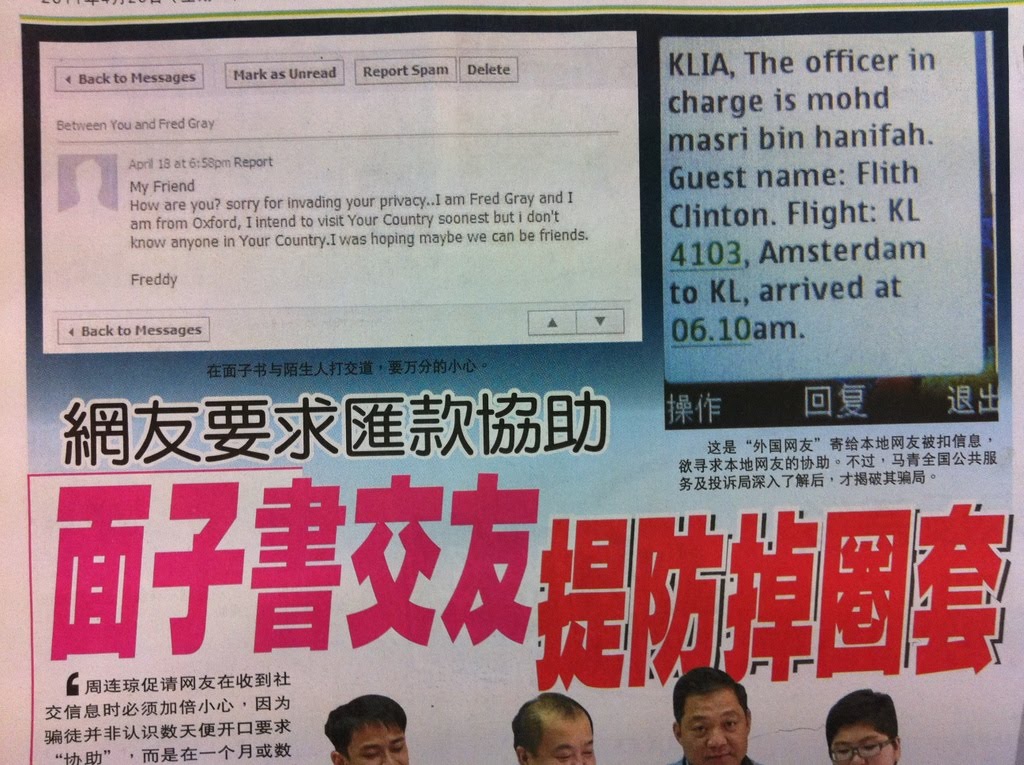

Tips to handle:
1. Inform the "Kastam Officer" to use the foreigner cash to pay the compaund.
2. Do not simply add friends from Facebook.
Wednesday, March 23, 2011
Email Scam / Internet crime

Step 1
An email send to your inbox:
Congratulations! You have won big lottery!
Please contact us via XXXXXXXXXXXXX to redeem your prizes and cash!
Step 2
Once you respond/reply to the email, some one will call you to give you a set of instruction to redeem the prize. BUT YOU NEED TO PAY FOR A TRANSACTION/ PROCESSING FEES.
Important Note:
Tell the organiser, "IF I AM SO LUCKY, PLEASE SEND ME THE PRIZE FIRST. ONCE I RECEIVED IT, I WILL PAY YOU THE TRANSACTION FEE"
Tuesday, March 22, 2011
Internet Scam via Scoial Networking
Reported 23/3/11 SinChew Jitpoh
NOTHING NEW - this is a repeated scam by a group of foreign fraudsters.

Step 1
Joined social media and add and flirt with the victim
Step 2
Make the victim fall in love by sweet talk, persuasive writting etc
Step 3
Pretend facing family and financial problems and beg for monies

NOTHING NEW - this is a repeated scam by a group of foreign fraudsters.

Step 1
Joined social media and add and flirt with the victim
Step 2
Make the victim fall in love by sweet talk, persuasive writting etc
Step 3
Pretend facing family and financial problems and beg for monies

Tuesday, March 15, 2011
Maybank2u.com Scam
This is how the Online Banking Scam happened:

Step 1
An Email sent from "Maybank" and seeking online banking users to update their profile for secutrity reason by clicking the hyperlink in the email.


Step 2
Users are required to enter Login ID and Password
The screen will pause for 10-20 seconds (this is to allow the hacker to save the ID and password)
Step 3
The screen will change to mainternance screen and seek users to login later.

Step 4
The Hackers wil login legally and transfer the monies out to 3rd party account.
This has happened 7-8 years ago...and keep rpeated again and again.
Alert:
1. Bank dont send email to your mailbox unlss you request a service from them via email
2. Bank dont seek your ID and password via email
3. Call the bank if you suspect something fishy.
Maybank 24H Call center 1300 88 6688

Step 1
An Email sent from "Maybank" and seeking online banking users to update their profile for secutrity reason by clicking the hyperlink in the email.


Step 2
Users are required to enter Login ID and Password
The screen will pause for 10-20 seconds (this is to allow the hacker to save the ID and password)
Step 3
The screen will change to mainternance screen and seek users to login later.

Step 4
The Hackers wil login legally and transfer the monies out to 3rd party account.
This has happened 7-8 years ago...and keep rpeated again and again.
Alert:
1. Bank dont send email to your mailbox unlss you request a service from them via email
2. Bank dont seek your ID and password via email
3. Call the bank if you suspect something fishy.
Maybank 24H Call center 1300 88 6688
Subscribe to:
Posts (Atom)